
Docs
Choose your preferred AI platform and authentication method to get started with Agentsfera.
Cursor
Integrate Agentsfera with Cursor AI Code Editor
Cursor is the AI-first code editor built for maximum developer productivity. By connecting Agentsfera to Cursor, you enable your AI coding assistant to access live data from project management tools, documentation systems, cloud platforms, and 500+ other integrations - all within your coding workflow.
Why Integrate Cursor with Agentsfera?
- Context-Aware Coding: Let Cursor access Jira tickets, Confluence docs, GitHub issues, and Azure DevOps work items while you code.
- Live Data Integration: Pull real-time information from databases, APIs, and business systems directly into your code editor.
- Flexible Authentication: Choose OAuth for quick setup or API keys for automated environments and CI/CD pipelines.
- MCP Protocol Support: Cursor's native Model Context Protocol (MCP) support makes integration seamless - just add the configuration and start coding.
Getting Started with Cursor + Agentsfera
Setting up Agentsfera in Cursor takes less than 2 minutes. You can authenticate via OAuth (browser-based) or use API keys with custom headers for advanced control. Both methods provide instant access to all Agentsfera tools and integrations.
Step 1: Open Cursor Settings
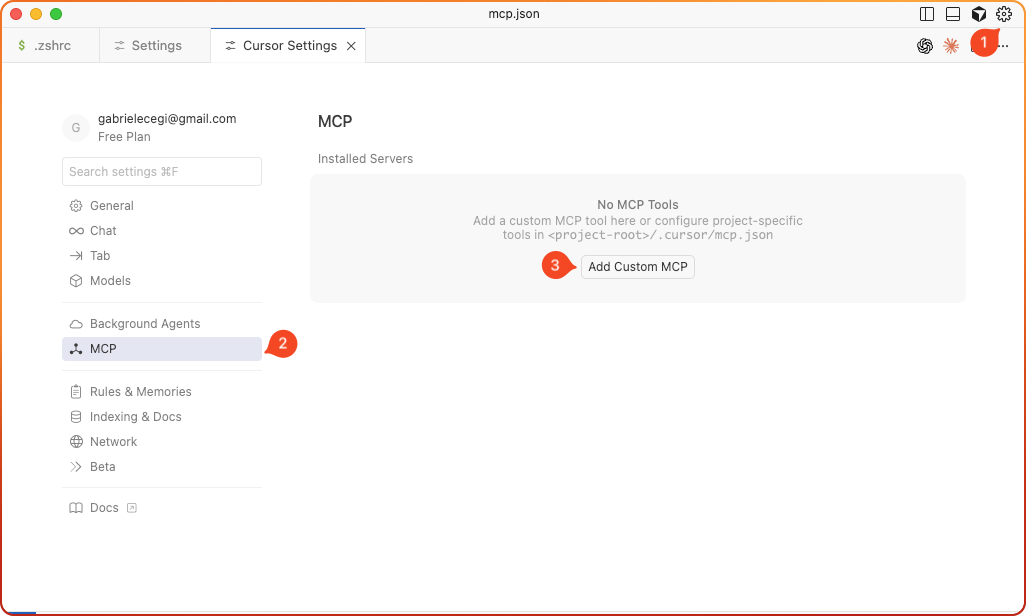
Step 2: Add Custom MCP Server
{
  "mcpServers": {
    "agentsfera": {
      "url": "https://api.agentsfera.ai"
    }
  }
}
Step 3: Authenticate
🎉 Success: You now have access to all Agentsfera tools in Cursor.
Example Usage
You:
"Show me calendar appointments with external clients"
💡 Tip: You can ask natural questions about your connected services and Agentsfera will automatically use the right tools.